Hungry Frog Education Software Version 6.0
Hungry Frog Spanish Language Software Program
Player Menu | My Login Preferences
The Player Menu My Login Preferences brings up the dialog to let you set your preferences for your use account.
Player Menu | My Login Preferences

Clicking on the Spanish student My Login Preferences menu item brings up the screens to manage student user settings and login preferences for the Hungryfrog Spanish software program for homeschool Spanish programs and K-12 Spanish teaching curricula:
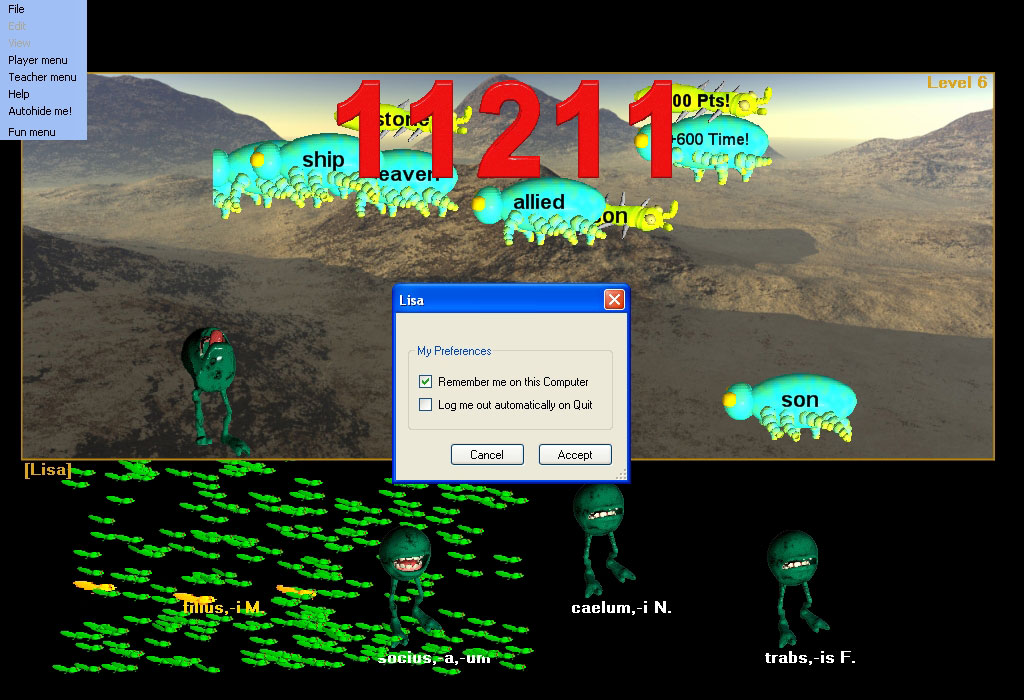
'Remember me on this Computer' - turn on or off presence of student name in the list at startup and login.
'Log me out automatically on Quit' - turn on or off the automatic logout of student account on game quit
When you as a Spanish student (or as a Spanish teacher using the software program and Spanish Teacher Menu features) have 'Remember me on this Computer' checked, your name will appear in the list at the login dialog at startup and when you login or out of the program:

When you use this dialog either as a Spanish teacher or Spanish student to turn off 'Remember me on this Computer' your name will not appear in the list. You need to be logged into the program whether you are a Spanish teacher (Spanish homeschool program teacher or K-12 Spanish teacher) or a Spanish student. To access the features of the Spanish Teacher Menu, you must be logged into the program. You do not need to be remembered on the computer to use the Hungryfrog Spanish Teacher menu features of the Spanish software program, however. You can login, change program settings using the Spanish Teacher Menu options and then logout without leaving your name in the list of remembered Spanish students (or Spanish teachers). If you use the Spanish Teacher menu to define a teacher password, then you need to remember your password, but you do not need to keep your account remembered on the computer. You can access the Spanish Teacher Menu settings from ANY Spanish student or Spanish teacher account - not just your own.
|
Hungryfrog Education Software
Online Program Tips
Hungryfrog Education Software new game design: Tongue Bonus
Part of the new Hungryfrog education software program game design: Tongue Bonus Bugs are great things, but it is important to understand how they work to get the most out of them. You can then devise your own strategies and see which give you the most points overall at game end.
When do I lose my tongue bonus? Once you have a good fat, wide tongue, you don't want to lose it. You lose the entire Tongue Bonus for any frog if that frog makes a wrong attempt to eat a bug (if your frog fails to match the English definition bug to its Latin dictionary Latin word English definition list). If that happens, not only does that frog lose his entire Tongue Bonus, but every other frog at that level also loses part of their Tongue Bonus. In other words, once you have a nice big fat tongued frog or two, you want to be extra careful about what you eat, or you will lose the bonus. This isn't the end of the world however, as you also have all your frog tongues start again at the narrowest width at the start of each new level. This does make the Tongue Bonus bugs really really important at very high levels where you can get a huge score if you can get some early Tongue Bonus bugs eaten and then keep them for the entire level - later levels take a lot longer to finish, so you have a lot of English definition bugs to eat.
|
Hungryfrog User Community
Participate in the Hungry Frog Education Software User Community to share your lessons and ideas with others and to report program bugs and suggest improvements to the PC computer software and the free Java applets at the web site.
|
If you have 'Remember me on this Computer' checked and 'Log me out automatically on Quit' checked, then your name will appear in the Hungry Frog Login screen every time you start the game and the Hungry Frog Login will appear when you restart the Spanish software program after you quit. Your selection of 'Log me out automatically on Quit' means that when you quit the game you log out, and as you are quiting not just switching users during the same game session, you will log out and the game will exit with no player logged in at all. Hence, the appearance of the Login screen at the next game start.
If you have 'Log me out automatically on Quit' UN-checked and quit the game, then when you logout YOU WILL REMAIN LOGGED IN WHEN THE GAME RESTARTS. The next time you restart the game (or anyone else restarts the game) your account will the active player account and the game will start where you left off.
NOTE: If you are a solo user using the program on one computer, you can un-check 'Log me out automatically on Quit' and un-check 'Remember me on this Computer' and the program will behave as if it were only for one player and had no multi-user login/logout at all. You can quit and restart the game and the game will pick up where you last left off with no dialogs in between. You will be the only person using the software, and the program will not display the login screen as long as you do not change your My Login Preferences settings.
See the Player Menu | Login / Change User pages for details.